
What is People Analytics? A Guide for SAP SuccessFactors Customers
3n Strategy · · 12 min read
Every organisation makes decisions about its workforce. Who to hire, which skills to develop, where to invest in talent and how to retain valuable employees. These decisions affect business performance, workforce costs and the organisation's ability to achieve its goals.
For organisations using SAP SuccessFactors, much of the data needed to inform these decisions already exists within their HR systems.
Employee Central provides a foundation of workforce information, while other SuccessFactors modules support areas such as recruitment, learning, performance and compensation. Together, these systems capture valuable information about an organisation's people.
But collecting workforce data and using it to make better workforce decisions are two very different things.
This is where People Analytics comes in.
In this guide, we explain what People Analytics is, why it matters to HR leaders, how it supports data-driven HR and how SAP SuccessFactors customers can use their existing workforce data to make more informed decisions.

What is People Analytics?
People Analytics is the practice of using workforce data, analysis and evidence to help organisations make better decisions about their people.
At 3n Strategy, we define People Analytics as:
The practice of producing and using evidence, in the form of data and analytics, to increase the likelihood that better decisions are made about the workforce.
The important part of this definition is decision-making.
People Analytics is not simply about producing HR reports, building dashboards or analysing employee data. Its purpose is to give HR and business leaders the evidence they need to make more informed decisions.
For example, a CHRO might want to understand why employee turnover is increasing, which departments face the greatest skills shortages or whether the organisation has the workforce capabilities required to deliver its business strategy.
People Analytics helps answer these questions using evidence rather than relying entirely on experience, assumptions or intuition.
It can support decisions at every level of an organisation, from strategic workforce investments made by senior leadership to everyday decisions about recruitment, development and retention.
The goal is simple: give the right people the right workforce information at the right time, so they can make better decisions.
What is the difference between HR Analytics and People Analytics?
The terms HR Analytics, People Analytics, Workforce Analytics and Talent Analytics are often used interchangeably.
Although organisations sometimes use these terms to describe slightly different activities, they generally share the same objective: using workforce data to improve decision-making.
HR Analytics traditionally focuses on HR-related data and processes, such as recruitment, absence, turnover and compensation.
People Analytics often describes a broader approach, connecting workforce information to business outcomes, organisational performance and longer-term workforce strategy.
Workforce Analytics frequently emphasises workforce composition, capacity, costs and planning, while Talent Analytics may concentrate on recruitment, performance, skills and development.
In practice, the distinctions are less important than the decisions these activities support.
For SAP SuccessFactors customers, the priority should not be deciding which terminology to use. It should be understanding how the workforce data already held within SuccessFactors can help HR and business leaders answer important questions.
Why is People Analytics important?
HR leaders are increasingly expected to demonstrate how their workforce contributes to business performance.
The CHRO is responsible for much more than HR operations. They must help the organisation anticipate future workforce requirements, manage talent risks, control costs and ensure the business has the capabilities it needs to succeed.
Doing this effectively requires more than knowing how many people the organisation employs.
People Analytics helps organisations move from simply understanding what has happened to understanding why it happened, what might happen next and what actions could improve the outcome.
Consider employee turnover.
A traditional HR report might show that turnover increased from 10% to 14% over the past year.
People Analytics takes the conversation further.
Which employee groups are leaving? Is turnover concentrated in particular locations, job families or management teams? Are valuable skills being lost? What might be contributing to the increase, and where should HR focus its attention?
These are the questions that help HR move from reporting a problem to making decisions about it.
Five benefits of People Analytics
1. Better workforce decisions
People Analytics gives HR and business leaders a stronger evidence base for decisions about recruitment, retention, development and workforce investment.
2. Earlier identification of workforce risks
By analysing trends in turnover, skills, workforce demographics and other indicators, organisations can identify potential challenges before they become more serious.
3. More effective workforce planning
People Analytics helps organisations understand their current workforce and compare it with the capabilities they will need in the future.
4. Greater confidence in HR investments
Workforce data can help leaders assess whether investments in recruitment, learning, development and other HR programmes are producing the intended results.
5. A more strategic role for HR
When HR can connect workforce information to business priorities, it becomes better equipped to contribute to strategic planning and executive decision-making.
Importantly, People Analytics does not remove the need for human judgement. Data provides evidence, but HR expertise, organisational context and experience remain essential to making good decisions.
What questions can People Analytics help HR answer?
One of the simplest ways to understand the value of People Analytics is to consider the questions an HR leader should be able to answer about their workforce.
For example:
Workforce composition and costs
How many employees do we have, and how is our workforce changing?
Which business units are experiencing the greatest increases in workforce costs?
How does our workforce composition compare across regions, departments and job families?
Employee retention and recruitment
Where are we losing our most valuable employees?
Which roles are becoming increasingly difficult to recruit?
Are our recruitment efforts delivering the skills the business needs?
Skills and development
What skills do we have across the organisation today?
Where are our biggest capability gaps?
Are our learning and development investments helping close those gaps?
Performance and productivity
How does workforce performance vary across different parts of the business?
What relationships exist between employee development, engagement and performance?
Where might changes in workforce structure or capability improve business outcomes?
Strategic Workforce Planning
What workforce capabilities will we need over the next three to five years?
Where are future skills shortages likely to emerge?
Should we recruit, reskill or redeploy employees to meet future demand?
These questions illustrate why People Analytics matters.
HR leaders don't necessarily want more dashboards. They want answers to questions that help them make better decisions.
For SAP SuccessFactors customers, the opportunity is to make the data already captured across their HR systems more useful, accessible and relevant to those decisions.
What types of People Analytics are there?
People Analytics can be divided into four broad categories, each supporting a different level of understanding and decision-making.
1. Descriptive Analytics: What happened?
Descriptive Analytics examines historical and current workforce information.
Examples include headcount trends, employee turnover, absence rates, recruitment activity and workforce demographics.
This is often where organisations begin, using reporting and dashboards to establish visibility of their workforce.
2. Diagnostic Analytics: Why did it happen?
Diagnostic Analytics investigates patterns and relationships within workforce data.
For example, an organisation might explore why employee turnover is higher in certain departments or whether differences in management, location or employee experience are associated with retention outcomes.
This helps decision-makers understand potential contributing factors rather than simply observing a trend.
3. Predictive Analytics: What might happen next?
Predictive Analytics uses historical information, statistical techniques and modelling to estimate possible future outcomes.
Examples include forecasting workforce demand, identifying potential retention risks or estimating future skills shortages.
These predictions are not certainties. They provide evidence about possible outcomes and their likelihood, helping organisations prepare more effectively.
4. Prescriptive Analytics: What should we do?
Prescriptive Analytics goes further by helping organisations evaluate potential actions.
For example, workforce planning models might compare the likely costs and benefits of recruiting new employees, developing existing staff or redeploying talent.
The objective is to help decision-makers understand their options and make more informed choices.
These categories are not necessarily separate stages that every organisation must complete.
A simple descriptive report can be extremely valuable if it answers an important business question. Equally, an advanced predictive model offers little value if nobody uses its findings.
The sophistication of the analytics matters less than the quality of the decisions it helps improve.
Why should SAP SuccessFactors customers invest in People Analytics?
Most organisations implement SAP SuccessFactors to address important HR priorities.
Employee Central provides the core HR foundation, helping organisations manage employee records, organisational structures and workforce information.
Additional modules are often introduced according to business requirements. Recruiting supports talent acquisition, Learning helps manage employee development, and Performance & Goals supports performance management.
These are important investments, and each addresses a clear operational or business need.
However, analytics and reporting are often treated as secondary priorities, something to consider once the core HR systems are implemented and operating effectively.
This can leave organisations with sophisticated HR systems that capture substantial amounts of workforce information, but limited ability to use that information strategically.
Consider an organisation that has invested in Employee Central, Recruiting and Learning.
It may be able to manage its employee population, recruit new talent and deliver training programmes effectively.
But can its CHRO easily answer questions such as:
Which skills are we investing most heavily in developing?
Are those investments addressing our most important capability gaps?
Where are we struggling to recruit the skills we need?
How might these challenges affect our workforce strategy over the next three years?
Answering these questions may require information from several SuccessFactors modules, consistent workforce metrics and analytical capabilities that go beyond standard operational reporting.
This is why People Analytics deserves attention alongside other SuccessFactors investments.
Employee Central helps you manage your workforce. People Analytics helps you understand your workforce and make better decisions about its future.
The two should complement each other.
What People Analytics tools are available within SAP SuccessFactors?
SAP offers several reporting, analytics and planning capabilities that can help SuccessFactors customers make better use of their workforce data.
The right approach depends on the organisation's existing SAP landscape, analytical requirements and the types of decisions it wants to support.
SAP SuccessFactors Reporting (Report Stories)
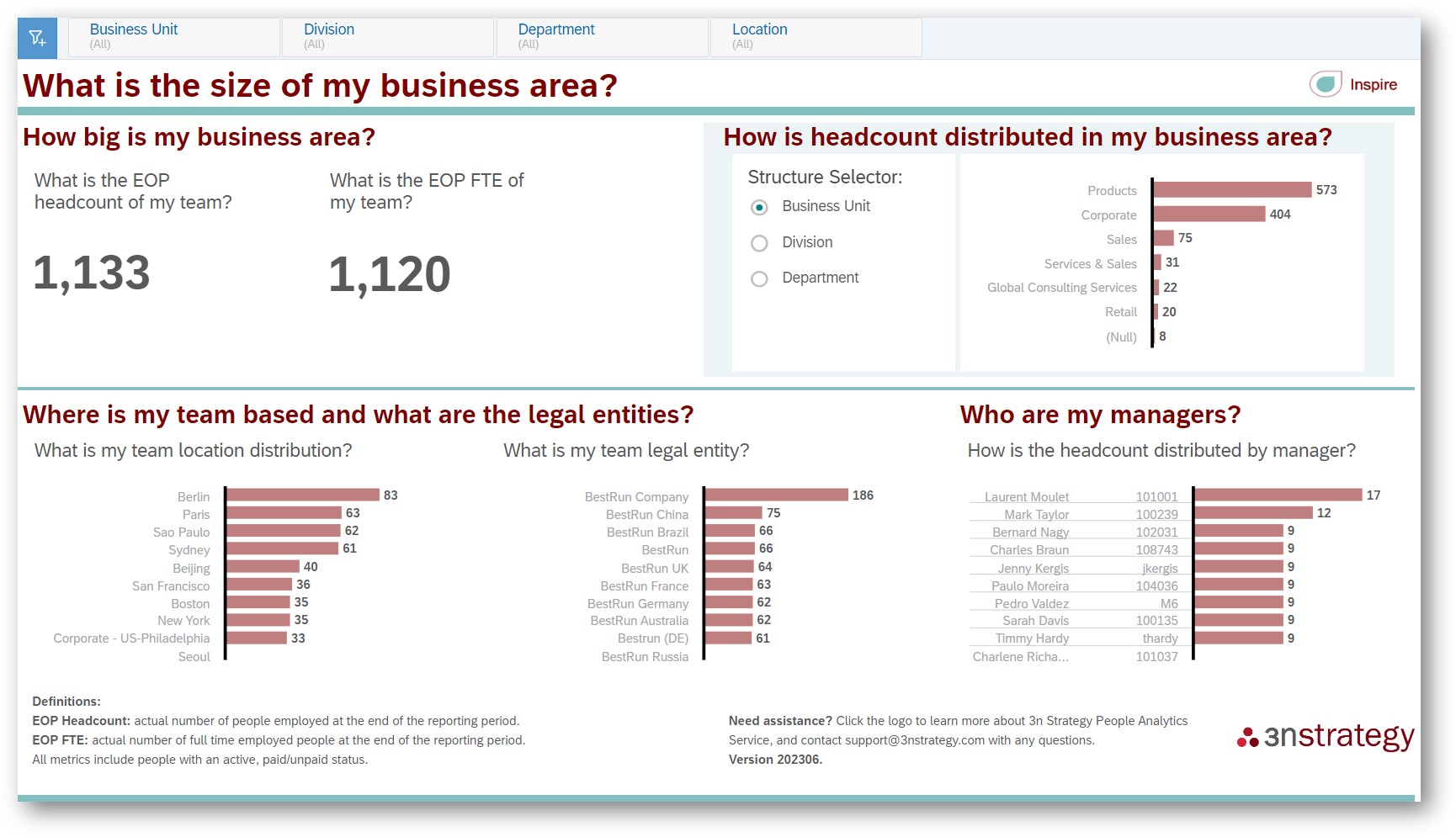
SAP SuccessFactors includes reporting capabilities that help organisations access and analyse information held within their HR system.
Report Stories, built on SAP Analytics Cloud technology, provide reporting and visualisation capabilities within SuccessFactors, subject to the relevant data sources and permissions.
These capabilities are particularly useful for operational reporting, workforce monitoring and making HR information accessible to users.
For many organisations, improving their existing SuccessFactors reporting is an important first step towards more effective People Analytics.
SAP People Intelligence
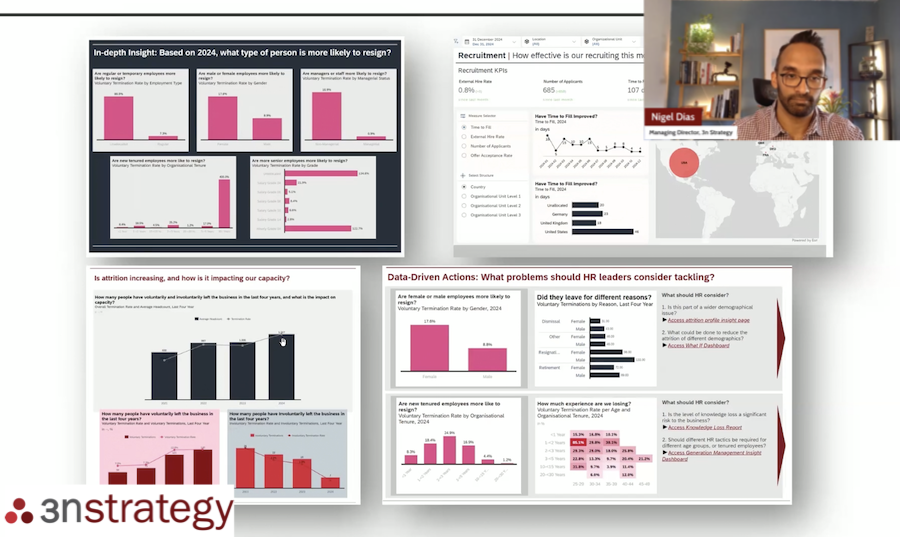
SAP People Intelligence represents SAP's evolving approach to workforce analytics, bringing together workforce information, metrics and analytical capabilities to help organisations understand their people more effectively.
Its purpose is to help HR leaders move beyond isolated reports towards a more connected understanding of their workforce.
For example, rather than examining recruitment, employee movement, skills and performance information separately, organisations can work towards a more joined-up view of workforce challenges and opportunities.
People Intelligence is particularly relevant to SuccessFactors customers looking to expand their analytical capabilities and make workforce information more useful to HR and business decision-makers.
The capabilities available to an individual customer will depend on their SAP environment, licensing, configuration and SAP's evolving product roadmap.
SAP Analytics Cloud and SAP Business Data Cloud
SAP Analytics Cloud provides broader business intelligence, analytics and planning capabilities.
It can support more sophisticated analysis, visualisation and planning requirements, including scenarios where organisations need to connect workforce information with financial or operational data.
SAP Business Data Cloud also forms part of SAP's wider data and analytics strategy, providing a foundation for connecting and managing business data across different systems.
For organisations with more complex analytical requirements, these technologies can help connect workforce decisions to broader business priorities.
SAP Joule and Conversational Analytics

One of the most significant developments in People Analytics is the growing role of conversational AI.
Traditionally, answering a workforce question might require an HR leader to request a report, navigate a dashboard or ask an analyst to investigate the data.
Conversational Analytics introduces a different experience.
Rather than starting with a report, users can start with a question.
For example, a CHRO might ask:
“Which parts of our business have experienced the highest employee turnover over the past year?”
They could then follow up with:
“How does that compare with the previous year?”
Or:
“Which job families have been most affected?”
SAP's investment in Joule and AI-powered analytical capabilities is moving towards making these types of interactions more accessible within its business applications.
The longer-term opportunity is for HR leaders to access relevant workforce information through natural-language conversations, without needing to understand the underlying reporting technology.
Specific conversational capabilities and their availability will vary by SAP product, release and customer configuration.
For SuccessFactors customers, this changes the conversation from which reports HR can access to which workforce questions HR can answer.
How do you get started with People Analytics in SAP SuccessFactors?
For organisations already using SAP SuccessFactors, getting started with People Analytics does not necessarily mean launching a large transformation programme or immediately investing in new technology.
A more effective approach is to begin with the decisions the organisation wants to improve.
Step 1: Identify the workforce questions that matter
Start by speaking with your CHRO, HR leadership team and business stakeholders.
What workforce decisions are they currently making? Which questions are difficult to answer? Where would better evidence make the greatest difference?
Prioritise a manageable number of questions connected to important business outcomes.
Step 2: Understand the data already available in SuccessFactors
Review the workforce information held within Employee Central and any other SuccessFactors modules your organisation uses.
Identify which data is relevant to your priority questions, whether it is sufficiently reliable and where additional information may be required.
Not every question can be answered using SuccessFactors data alone. Some will require financial, operational or other business information.
Step 3: Assess your existing reporting and analytics capabilities
Before investing in additional technology, understand what your organisation can already achieve.
Review your SuccessFactors reporting environment, existing analytical tools, workforce metrics and the experience of the people who use them.
You may find opportunities to improve access to information, simplify existing reports or make better use of capabilities already available.
Step 4: Build a People Analytics roadmap
Develop a phased plan that connects business priorities to the data, technology and skills required.
For some organisations, this will mean improving operational reporting and establishing trusted workforce metrics.
For others, it may involve evaluating SAP People Intelligence, integrating additional data sources or developing more advanced workforce planning capabilities.
The roadmap should be driven by the questions the business needs to answer, not simply by the technologies available.
Step 5: Help HR leaders use the evidence
People Analytics only creates value when its findings influence decisions.
Ensure HR Business Partners, managers and senior leaders understand what information is available, how to interpret it and when to use it.
The objective is not simply to increase the number of people viewing dashboards.
It is to increase the number of workforce decisions being informed by relevant, reliable evidence.
Conclusion: Getting more value from SAP SuccessFactors starts with better workforce decisions
SAP SuccessFactors helps organisations manage some of their most important HR processes, from employee administration and recruitment to learning, performance and workforce development.
But the information captured through these processes has value beyond the operational activities it supports.
It can help HR leaders understand workforce challenges, identify emerging risks, plan for future capability requirements and make better-informed decisions about their people.
This is why People Analytics should not be treated as an optional reporting exercise to consider once every other SuccessFactors priority has been addressed.
It is an important part of turning an organisation's HR technology investment into business value.
For SAP SuccessFactors customers, the starting point is not necessarily another dashboard, another report or even another technology.
It is a simple question: What should our HR leaders be able to answer about our workforce, and how can we use the data we already have to help them answer it?
That is where effective People Analytics begins.